


Aploda.com – Dual user memory settings on electric standing desks allow two individuals to save their preferred sitting and standing heights, enabling seamless transitions between users with the touch of a single button. This feature eliminates the need for manual adjustments, ensuring ergonomic consistency and preventing repetitive strain for both partners sharing a workspace.
Why Couples Need Dual Memory Settings
Sharing a workspace is increasingly common, but physical differences between partners make shared desks a challenge. When one person is significantly taller or shorter than the other, the desk height requirements change drastically. Without memory presets, users often guess the height, leading to poor posture, neck pain, or lower back strain. Dual memory settings turn a standard desk into a personalized ergonomic station, saving seconds of frustration and protecting long-term health.
Common Challenges in Shared Workspace Ergonomics
The primary issue in a shared setup is the “adjustment fatigue.” If a desk requires manual holding of a button to move up or down, users are less likely to adjust it frequently. This leads to “lazy” ergonomics, where someone sits at a desk that is too high or stands at one that is too low. Over time, this causes musculoskeletal issues. By having dedicated buttons for User A and User B, the barrier to proper ergonomics is removed. It encourages both partners to switch between sitting and standing throughout the day, which is the core benefit of a standing desk.
Comparing Standard vs. Memory Preset Desks
| Feature | Standard Electric Desk | Dual Memory Preset Desk |
|---|---|---|
| Adjustment Speed | Manual/Slow | Automatic/Fast |
| Precision | Variable/Guesswork | Exact (to the millimeter) |
| User Convenience | Low | High |
| Ergonomic Consistency | Poor | Excellent |
How to Configure and Use Your Dual Memory Settings
Most modern standing desks utilize a similar programming logic for their handsets. While specific brands may vary, the following steps are the industry standard for setting up memory profiles for two users.
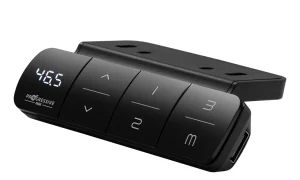
- Adjust the desk to your ideal sitting height using the up or down arrows.
- Press the “S” or “Settings” button on the handset until the display flashes.
- Select the number “1” to save your sitting height.
- Adjust the desk to your ideal standing height and repeat the process, saving it to button “2” or “3” depending on your controller layout.
- Have your partner repeat these steps for their preferred heights using the remaining memory buttons.
- Test the system by pressing the buttons to ensure the desk reaches the saved height without needing further manual tweaks.
Identifying the Right Desk for Two Users
When shopping for a desk for two, you must look for a “programmable handset.” Some entry-level electric desks only offer basic up and down controls. Ensure the product page explicitly mentions “memory presets” or “programmable height settings.” It is also crucial to check the weight capacity. If you and your partner have heavy equipment like multiple monitors, a heavy PC tower, or a solid wood tabletop, the motor must be robust enough to handle the combined load during frequent height adjustments.
Common Mistakes When Sharing a Desk
One frequent mistake is neglecting cable management. When two people use the same desk, the power cables and monitor cords move significantly more often than on a static desk. If the cables are too short, they can be pulled out or damaged during the transition from sitting to standing. Always use an under-desk cable tray and ensure your cords have enough slack to accommodate the maximum height range.
Another mistake is failing to calibrate the desk. If the desk seems to stop at the wrong height or displays an error code, it likely needs a reset. Most desks require you to hold the “Down” button until the desk reaches its lowest point, then hold it for an additional five seconds to recalibrate the internal sensors. Doing this once a month keeps the memory settings accurate.
The Impact on Productivity
Beyond health, there is a productivity gain. When you don’t have to fiddle with height controls, you remain in your “flow state.” For couples working from home, the ability to quickly swap the workspace over—perhaps during a lunch break transition—makes the home office feel less like a cluttered corner and more like a professional environment. It also reduces friction in the relationship; no one wants to argue over a desk that is stuck at the wrong height because the previous user didn’t reset it properly.
FAQ: Dual User Standing Desks
Q: Can I upgrade a standard desk to have memory settings?
A: In most cases, you cannot simply add memory buttons to a non-programmable desk because the control box (the “brain” of the desk) lacks the software to store height coordinates. You would usually need to replace the entire control box and handset, which is often as expensive as buying a new frame.
Q: Will the memory settings be lost if there is a power outage?
A: Most high-quality electric standing desks feature non-volatile memory. This means the saved positions are stored on a chip that does not require constant electricity to maintain the data. Your settings should remain saved even after a power cut or if you unplug the desk to move it.
Q: How many memory slots do I need?
A: Ideally, you should look for a desk with at least four memory slots. This allows each user to save two positions: one for sitting and one for standing. If you only have two slots, you will have to compromise by choosing either a sitting or standing height for each person, which defeats the purpose of an active workstation.
📷 Photo by vari.com