


Aploda.com – Proper lumbar support is achieved by adjusting the chair’s backrest height and depth so that the curvature of the chair aligns perfectly with the natural inward curve of your lower spine, effectively distributing weight and reducing muscle strain.
Sitting for extended periods without adequate lumbar support is a primary driver of chronic lower back pain. Many people purchase expensive ergonomic chairs but fail to reap the benefits because they do not know how to calibrate the settings to their specific body dimensions. Achieving the correct setup is not just about comfort; it is about maintaining the spine’s neutral position, which prevents the flattening of the lumbar curve—a common precursor to disc compression and muscle fatigue.
The Anatomy of Proper Lumbar Alignment
Your spine has a natural S-shape. When you sit in a standard chair without support, your pelvis tends to tilt backward, causing your lower back to slouch or “hunch.” This puts immense pressure on the lumbar vertebrae. An ergonomic chair is designed to counteract this by providing a physical barrier that pushes gently against your lower back. The goal is to fill the gap between your lower spine and the backrest, ensuring your weight is supported by the chair rather than your own muscles.
📷 Photo by storage.googleapis.com
If the support is too high, it hits your mid-back and forces you forward. If it is too low, it digs into your sacrum or hips, causing discomfort. Finding the “sweet spot” requires a systematic approach to adjustment.
Step-by-Step Guide to Adjusting Your Chair
Follow these steps to ensure your chair is providing the maximum ergonomic benefit for your unique body type:
- Position your feet flat on the floor with your knees at a 90-degree angle. Adjust your seat height first, as everything else depends on this baseline.
- Sit all the way back in the chair so your glutes touch the backrest. Do not leave a gap between your body and the chair.
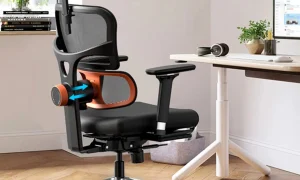
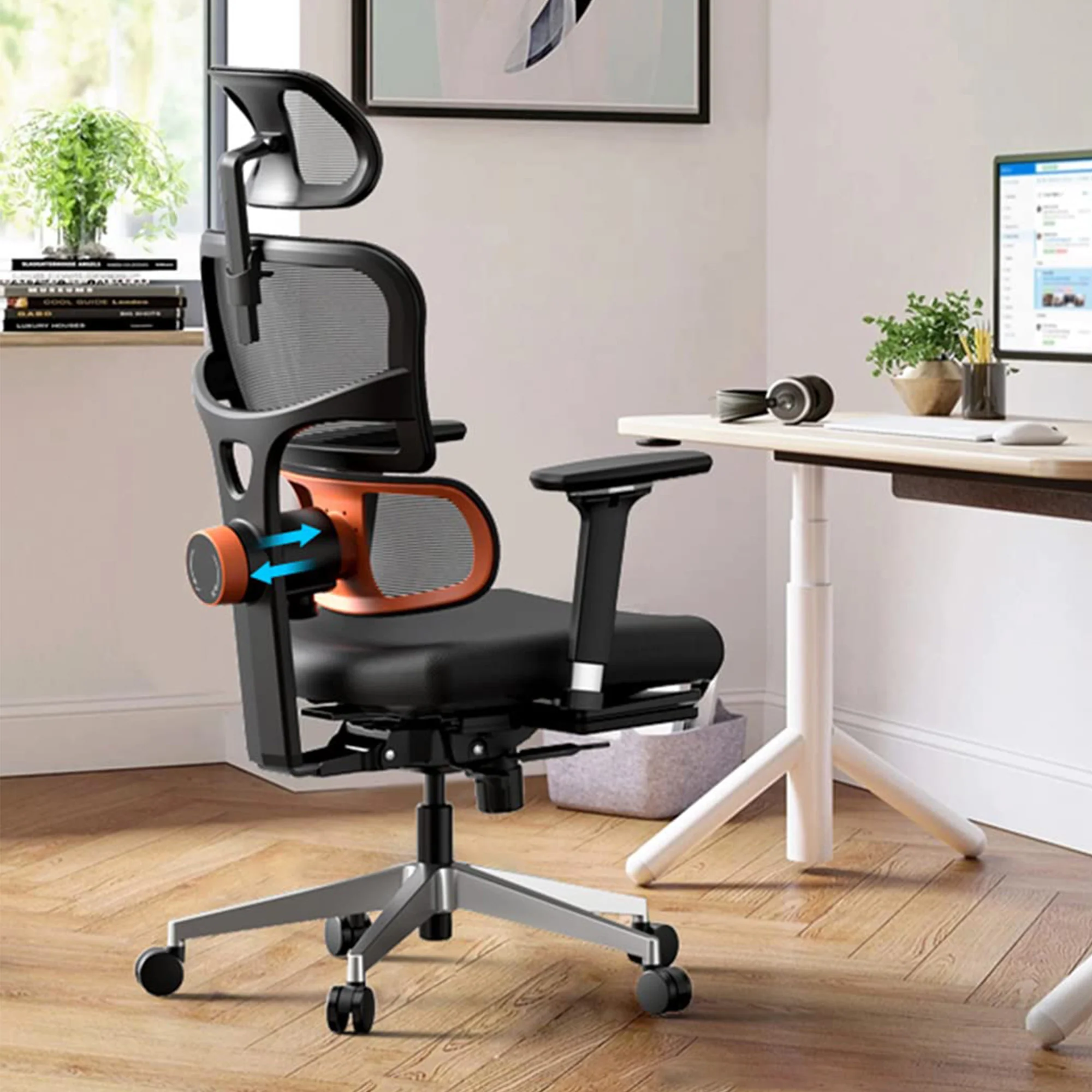
- Locate the lumbar adjustment knob or sliding mechanism. Move the lumbar support pad up or down until the thickest part of the cushion rests directly in the arch of your lower back (typically between your belt line and the bottom of your ribcage).
- If your chair has depth adjustment, pull the lumbar support forward until you feel firm, constant pressure against your lower back. It should feel supportive, not intrusive.
- Recline the backrest slightly to a 100-110 degree angle. This shifts some of your upper body weight to the backrest, which further engages the lumbar support system.
- Lock the backrest into place. Once you are comfortable, perform a “reset” by standing up and sitting back down to ensure the support is still positioned correctly.
Comparative Analysis of Support Types
Not all lumbar support systems function the same way. Understanding the mechanism of your specific chair can help you achieve better results.
| Support Type | Mechanism | Best For |
|---|---|---|
| Fixed Curvature | Pre-molded plastic or foam frame. | Users who fit standard ergonomic averages. |
| Height-Adjustable | Vertical track system for the backrest. | Users with longer or shorter torsos. |
| Depth/Air-Adjustable | Inflatable bladder or tension dial. | Users needing customized firmness levels. |
Common Mistakes and How to Fix Them
A frequent error is placing the lumbar support too high, thinking it will help “posture” by pushing the shoulders back. This actually encourages the user to slide forward on the seat, defeating the purpose of the back support entirely. If you find yourself sliding forward, your seat pan depth might be too deep, or your lumbar support is pushing your pelvis away from the backrest.
Another mistake is relying on the lumbar support while sitting at the very edge of the chair. Ergonomic features only work when you utilize the full depth of the seat. If you find that you cannot sit all the way back because the chair is too deep, consider using a separate lumbar pillow or a footrest to elevate your legs and bring your back into contact with the chair.
The Role of Micro-Movements
Even with the perfect setup, static sitting is detrimental to health. Ergonomic chairs are designed to allow for movement. Use the tension control on your chair to allow for slight rocking. This keeps the lumbar muscles active and prevents the stiffness that comes from remaining in one position for hours. If your chair feels “stiff,” loosen the tilt tension so the chair moves with your body, providing consistent support even as you shift your weight.
Frequently Asked Questions
Q: Should the lumbar support feel like it is pushing me forward?
A: It should feel like firm, comfortable pressure that maintains your spine’s natural curve. It should never feel like it is forcing you out of the seat or causing numbness.
Q: How do I know if my lumbar support is at the right height?
A: If it is correct, you should feel no pressure on your tailbone or your shoulder blades. It should feel as if the chair is “hugging” the small of your back.
Q: Can I use a pillow if my chair lacks lumbar support?
A: Yes, a dedicated orthopedic lumbar roll or a small firm pillow can be an excellent temporary solution. Ensure it is firm enough to provide support rather than just acting as a soft cushion.
Consistent maintenance of your chair settings is key. Check your adjustments every few months or whenever you feel discomfort. Sometimes, a simple adjustment of the backrest height by just half an inch is all it takes to alleviate chronic tension and improve your daily work experience.
📷 Photo by eurekaergonomic.com