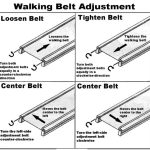



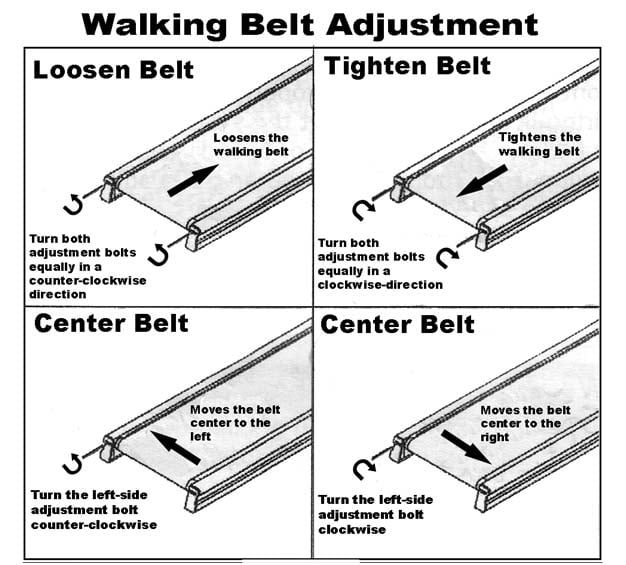
Aploda.com – Centering an under desk treadmill walking belt is achieved by tightening the adjustment bolt on the side toward which the belt is drifting while the treadmill is running at a slow speed. This precise mechanical adjustment corrects the tension imbalance that causes the belt to veer off-center.
Understanding Belt Drift
A walking belt rarely stays perfectly centered on its own over long periods of use. Because the belt is a flexible loop under constant tension, any slight misalignment in the rear roller or uneven pressure from your feet can cause it to shift to the left or right. If the belt rubs against the side rails, it creates friction, which can damage the belt edges and put unnecessary strain on the treadmill motor.
It is important to distinguish between a minor drift and a major tracking issue. A minor drift is common and easily corrected, but if the belt is constantly moving despite adjustments, you may have a loose roller or a worn-out belt that needs replacement. Always perform these adjustments while the treadmill is running at a low, safe speed, typically between 1.0 and 2.0 mph.
Step-by-Step Guide to Centering Your Belt
Before you begin, ensure your treadmill is on a flat, level surface. Uneven flooring is a frequent, overlooked cause of chronic belt drift. Follow these steps to realign the belt:
- Locate the adjustment bolts at the rear of the treadmill frame, usually found on the left and right sides of the rear roller.
- Start the treadmill and set it to a slow walking speed, approximately 1.5 mph.
- Observe the direction of the drift; if the belt is moving toward the left, you must adjust the left bolt, or vice versa.
- Using the Allen wrench (hex key) that came with your treadmill, turn the adjustment bolt on the side the belt is drifting toward by one-quarter turn clockwise.
- Wait for the belt to complete a full rotation, which usually takes about 30 to 60 seconds, to see if the alignment changes.
- If the belt has not centered, repeat the one-quarter turn adjustment and wait again; do not over-tighten, as excessive tension can damage the roller bearings.
Maintenance and Troubleshooting Table
| Symptom | Likely Cause | Recommended Action |
|---|---|---|
| Belt drifts to the left | Left tension is too loose | Tighten left bolt 1/4 turn |
| Belt drifts to the right | Right tension is too loose | Tighten right bolt 1/4 turn |
| Belt slips under feet | Overall tension is too low | Tighten both rear bolts equally |
| Burning smell/excess friction | Belt too tight or misaligned | Loosen bolts and check lubrication |
Common Mistakes to Avoid
Read also: Best Standing Desk Converter for Small Desks and Laptops
The most common mistake users make is over-adjusting. Many people become frustrated when the belt does not center immediately and proceed to turn the bolts multiple full rotations. This can lead to extreme tension that snaps the belt or burns out the motor. Always move in small increments of one-quarter turn and give the machine enough time to respond to the change in tension.
Another frequent error is failing to lubricate the deck. If the belt is not properly lubricated, the increased friction can cause it to pull toward one side even if the tension is perfectly balanced. Before adjusting the tracking, check the underside of the belt to see if it feels dry or tacky. If it does, apply a treadmill-specific silicone lubricant, as this often resolves “tracking” issues caused by uneven drag.
Risks of Neglecting Belt Alignment
Ignoring a misaligned belt is a recipe for long-term mechanical failure. When a belt rubs against the side plastic shroud, the friction generates heat. This heat can melt the edge of the belt, causing it to fray. Furthermore, a belt that is consistently pushed to one side puts uneven load on the motor and the rollers. Over time, this leads to a “whining” noise, which is a clear indicator that the motor is working harder than it should to overcome the resistance created by the misaligned belt.
Safety is also a significant concern. A belt that is significantly off-center can bunch up on one side, creating an uneven surface that increases your risk of tripping or losing your balance while walking. Regularly checking the belt alignment—perhaps once every two weeks or whenever you notice a slight change in the sound of the treadmill—will significantly extend the lifespan of your equipment.
📷 Photo by youtube.com
FAQ
Q: How do I know if I have tightened the bolts too much?
A: If the belt feels extremely stiff, makes a loud thumping noise, or if the treadmill motor sounds like it is struggling or slowing down, you have likely over-tightened the bolts and should back them off slightly.
Q: Does the walking belt need to be centered while I am standing on it?
A: No. You should never adjust the belt while standing on it. Always adjust it while the treadmill is running empty, then test it by walking on it for a minute to see if the alignment holds under your weight.
Q: What if the belt still drifts after several adjustments?
A: If the belt continues to drift regardless of your adjustments, the rear roller may be damaged, or the deck surface may be uneven. Check if your treadmill is sitting on a level floor and inspect the rear roller for any debris or physical damage.
📷 Photo by garagegympro.com